Capabilities

Machine building and controls, under one owner.

Four things carry into every Levra build: complete station design, modular hardware, a barcoded parts workflow, and a CODESYS controls foundation. Together they are why a machine arrives sooner, behaves consistently, and can be handed over cleanly.

Stations & cells

Fixtures, motion, controls, and safety designed together.

Most of the hard work in automation is in the fixtures, tooling, and the details of how a station actually handles your parts. We design and build complete stations where the fixture, motion, and control panel are engineered as one system, instead of three separate purchases someone has to reconcile later.

Getting the fixture right is also what makes later upgrades cheap. Parts that land in the same place every cycle are what allow a robot, extra motion, or inspection to be added without redesigning the station.

Custom fixtures and nests
Part position made obvious and repeatable, with quick-change options when SKUs vary.
Motion and robot programming
Built around the fixture, with clear states and straightforward recovery rather than fragile one-off code.
Control panel design and build
Clean DIN-rail wiring, clear labels, and room for future I/O so technicians and outside electricians can follow the panel.
Safety integration
E-stops, interlocks, light curtains, and guarding scoped from the beginning, not added at the end.
Retrofits and upgrades
Available where they make sense on equipment you already run.

Modular hardware

Hardware patterns proven before they reach your machine.

Bricks are the hardware patterns we reuse across builds: power, controls, motion, and pneumatic. They let us mock a cell on the bench in days and iterate on real hardware without rebuilding the panel between revisions.

Your machine does not ship with the bench rack. It ships in a custom industrial panel containing only the components that build needs, laid out for production — the same validated parts, packaged for your floor, so nothing new turns up at integration.

Select a brick to see it

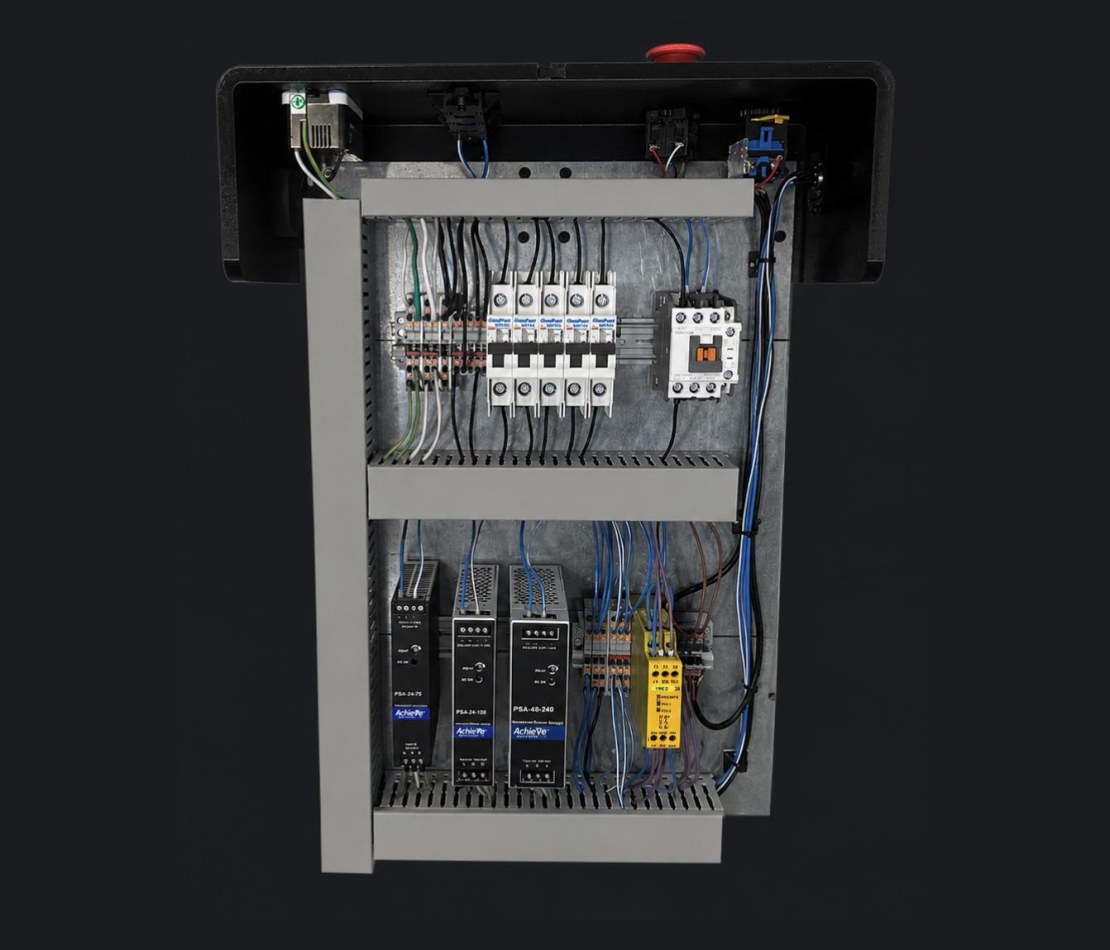
Power brick
AC input converted to 24V and 48V DC rails with breakers and protection on DIN rail. Built-in E-stop and safety relay. The clean-power foundation under every panel.
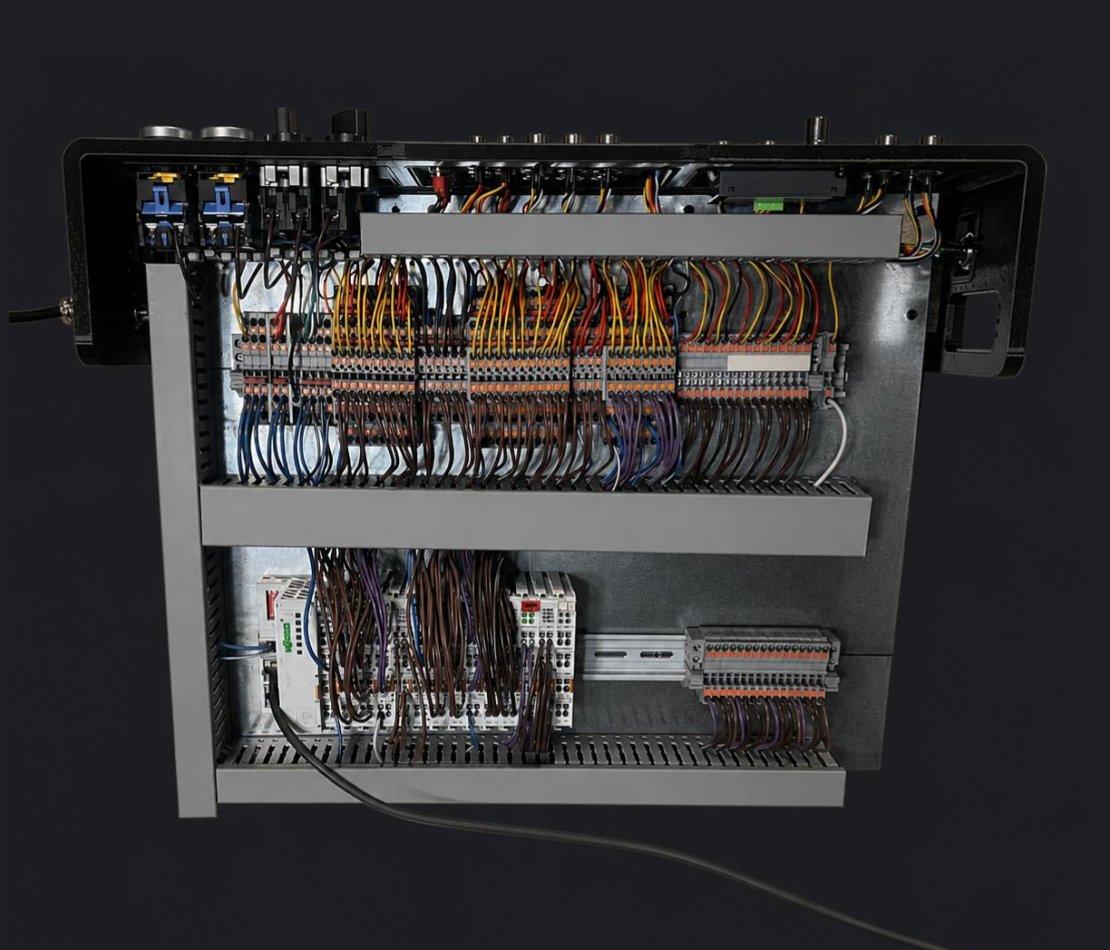
Controls brick
A soft PLC running the CODESYS runtime, talking Modbus/TCP to a Wago 750-352 fieldbus coupler that carries the digital and analog I/O. Swappable for different remote I/O, or for a hardware CODESYS PLC, without rebuilding the panel.
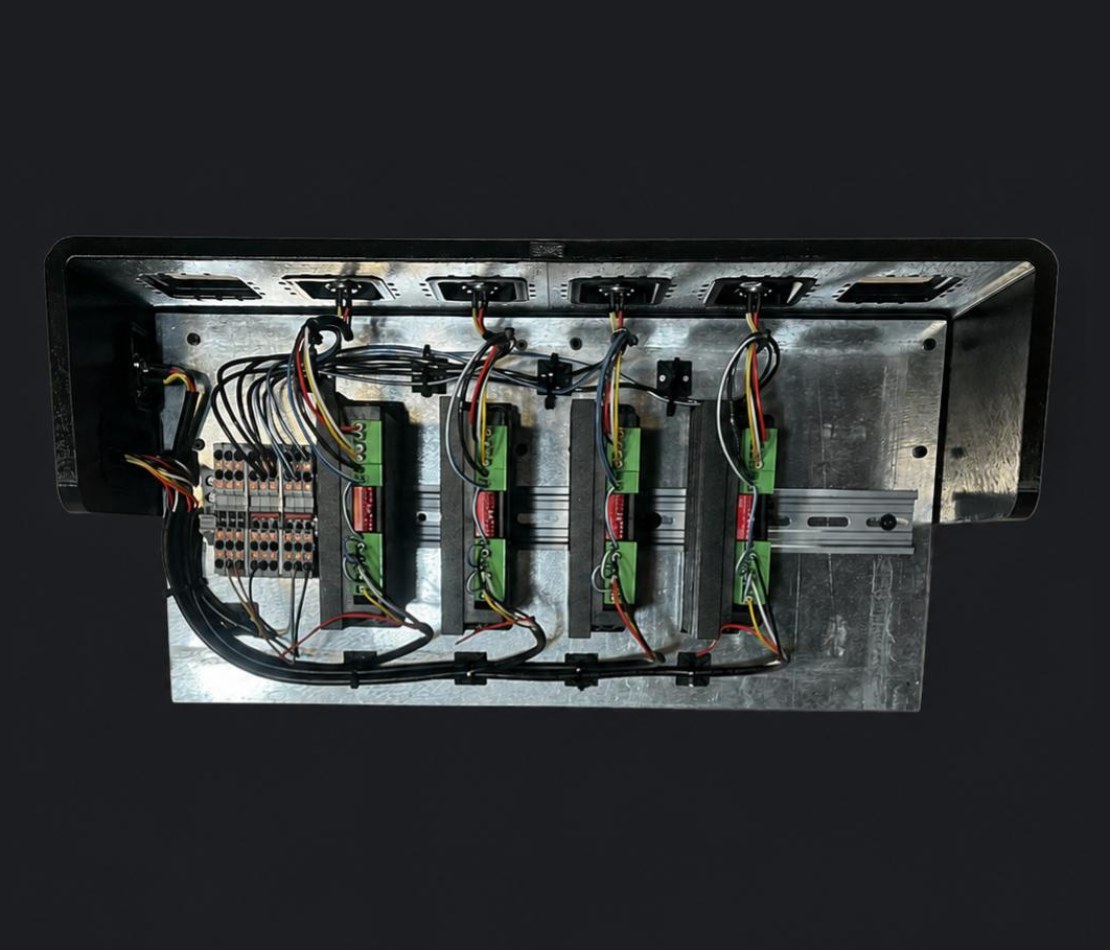
Motion brick
Stepper and servo drives for axes, gantries, and rotary stations. Chained after the controls brick when a project uses motor drives. Tuned, labeled, and field-replaceable.
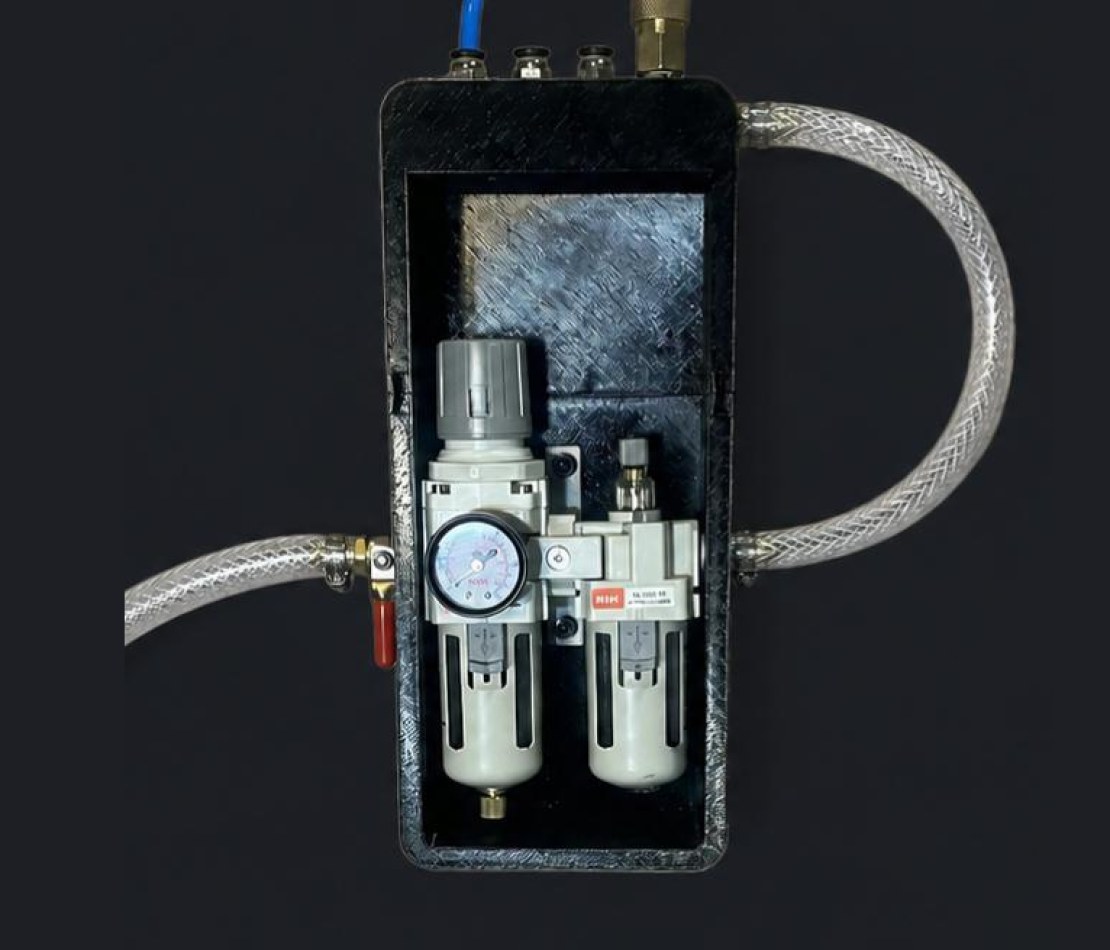
Pneumatic brick
Filtered air supply feeding a valve manifold; solenoid valves driven over a DB-25 cable from the controls brick. Reed sensors on the cylinders feed back to discrete I/O.
Power brick: 24V and 48V DC rails with E-stop and safety relay Controls brick: PLC, I/O and communication modules on DIN rail Motion brick: stepper and servo drives Pneumatic brick: filtered air supply feeding a valve manifold

Faster proof

A cell can be mocked up on the bench in days rather than weeks, so the approach is proven on your parts before a full build is committed.

Predictable BOMs

Reused parts mean fewer procurement surprises, because the sourcing and lead times are already known rather than discovered mid-build.

Commodity components

Wago, CODESYS, and FANUC are commodity parts you can source and service yourself. Nothing in your machine locks you to a proprietary vendor stack, and nothing is withheld to keep you calling us.

Parts workflow

Every part barcoded. Every build kitted before it starts.

Each step below feeds the next, and every link is auditable. From spec to assembly you can see which parts went into which machine and why — which is what makes a mid-build change a number instead of an argument.

Inventory walkthrough — from BOM to a kitted build Shop video
  1. Project spec

    Cell requirements, parts, and station definitions captured up front in one place.

    Output: spec
  2. BOM

    Vendor part numbers, quantities, and approved substitutes documented.

    Output: BOM
  3. Pick list

    Inventory allocated to the project; gaps flagged for ordering before the build.

    Output: pick list
  4. Kit pulled

    The complete kit sits on the bench before the first bracket goes on.

    Output: kitted build
  5. Guided assembly

    Show-on-diagram views point to the exact mount, wire, and pneumatic connection.

    Output: build record
  6. Checkout

    Every actuator and sensor verified in the CODESYS template’s manual HMI.

    Output: verified I/O

Scroll for all six steps →

What it prevents

No three-week pause because a line item was missed. Parts are on the shelf when the build needs them, and the allocation is visible before anyone starts rather than after a stall.

What it enables

When you change a spec mid-build, we can tell you which parts are affected and what the cost delta is. The same discipline holds whether the shop is running one machine or several in parallel.

Controls foundation

The same proven controls shell under every machine.

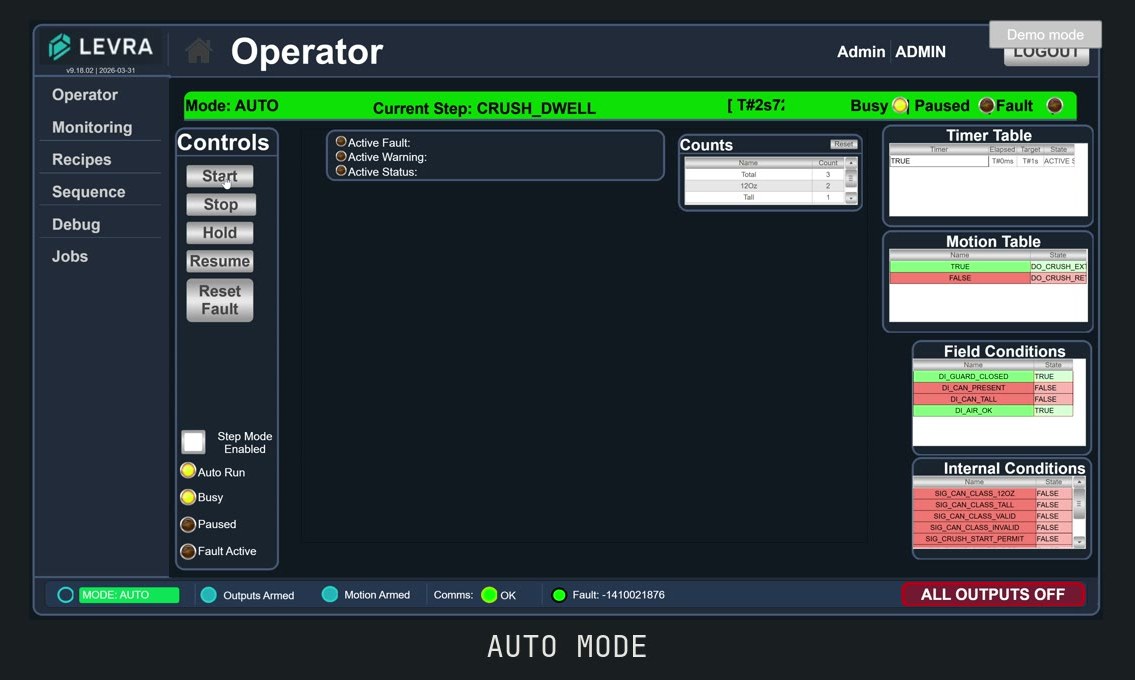
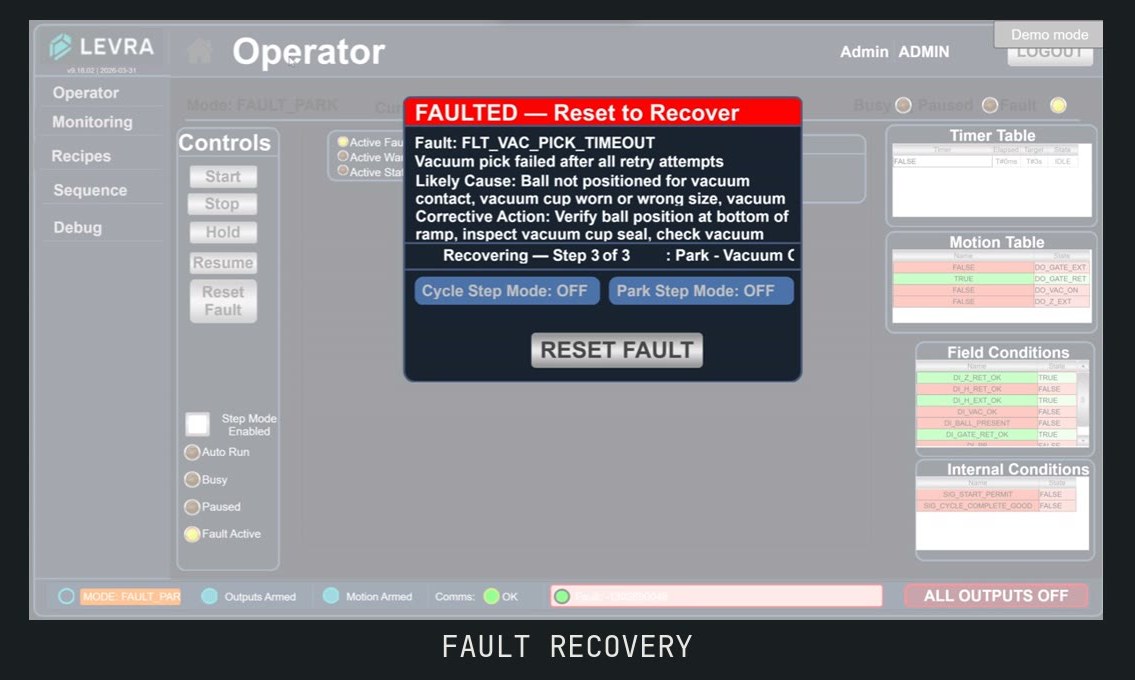
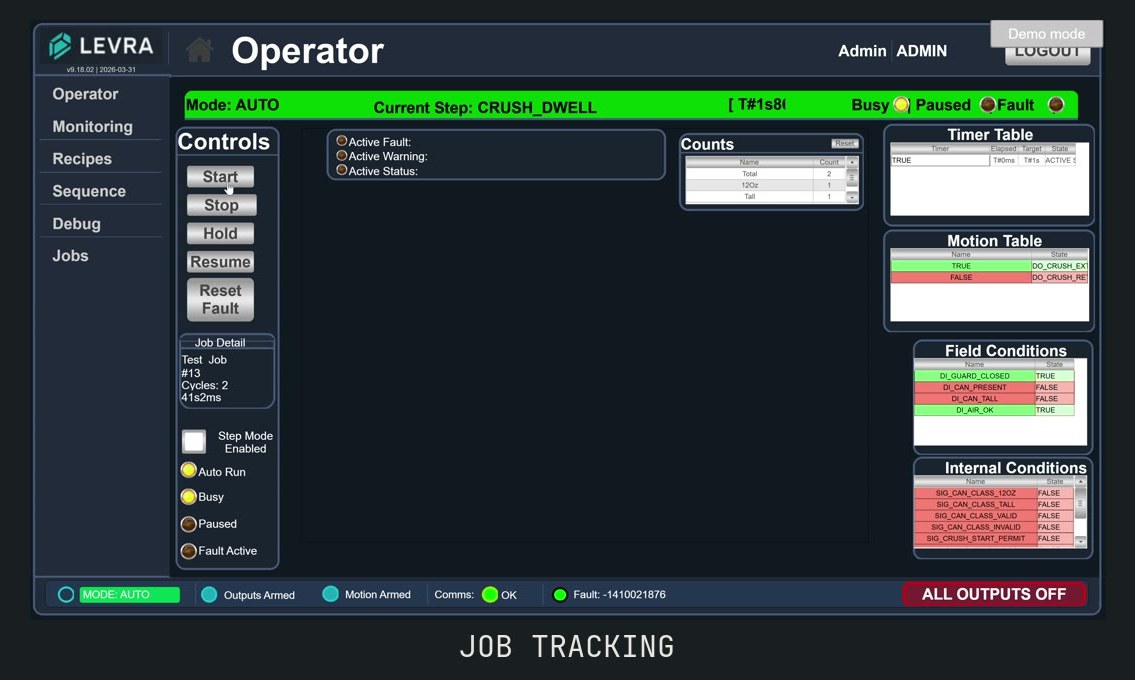
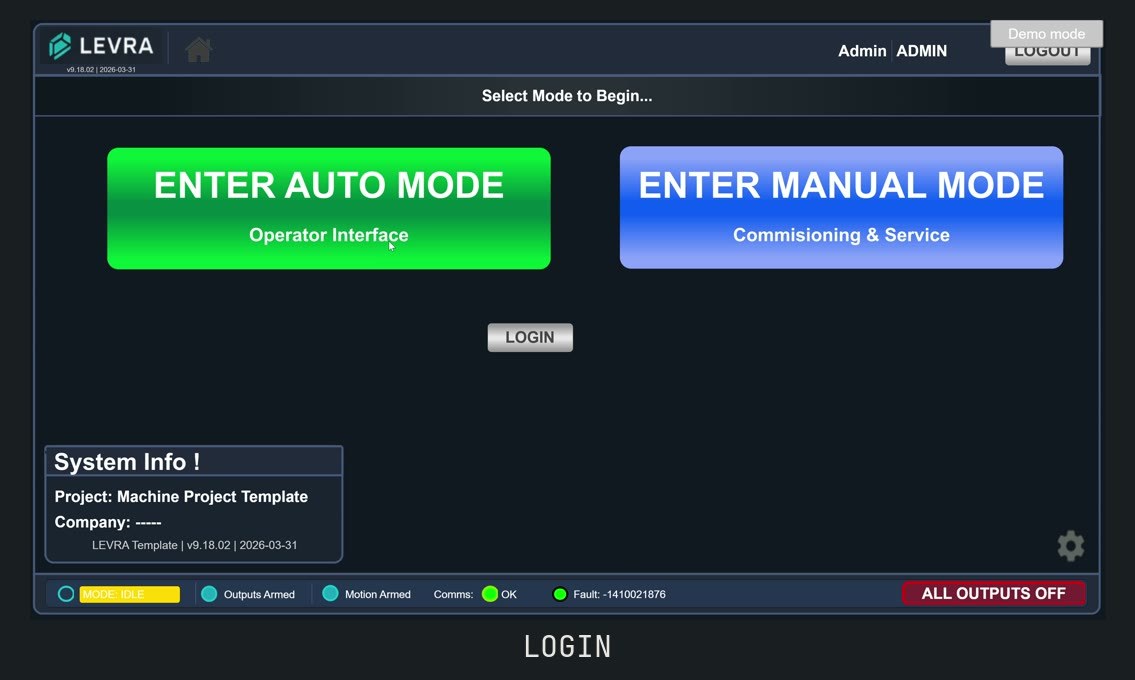
Login, operator control, mode management, fault recovery, job tracking, diagnostics, and manual override ship as a CODESYS template. Machine-specific code plugs into defined insertion points instead of being written on a blank project.

Select a feature to see the screen

Mode management
Auto / Manual / Park / Setup states with clear, operator-visible transitions.
Fault recovery
Every fault carries a code, a likely cause, a corrective action, and a recovery state, so operators know what to do when something stops.
Job tracking
Cycle counts, runtime, parts per hour, and CSV export per job. The event ring keeps recording even outside an active job.
Operator login
Role-based access. Operators, technicians, and admins each see what they need.
Diagnostics
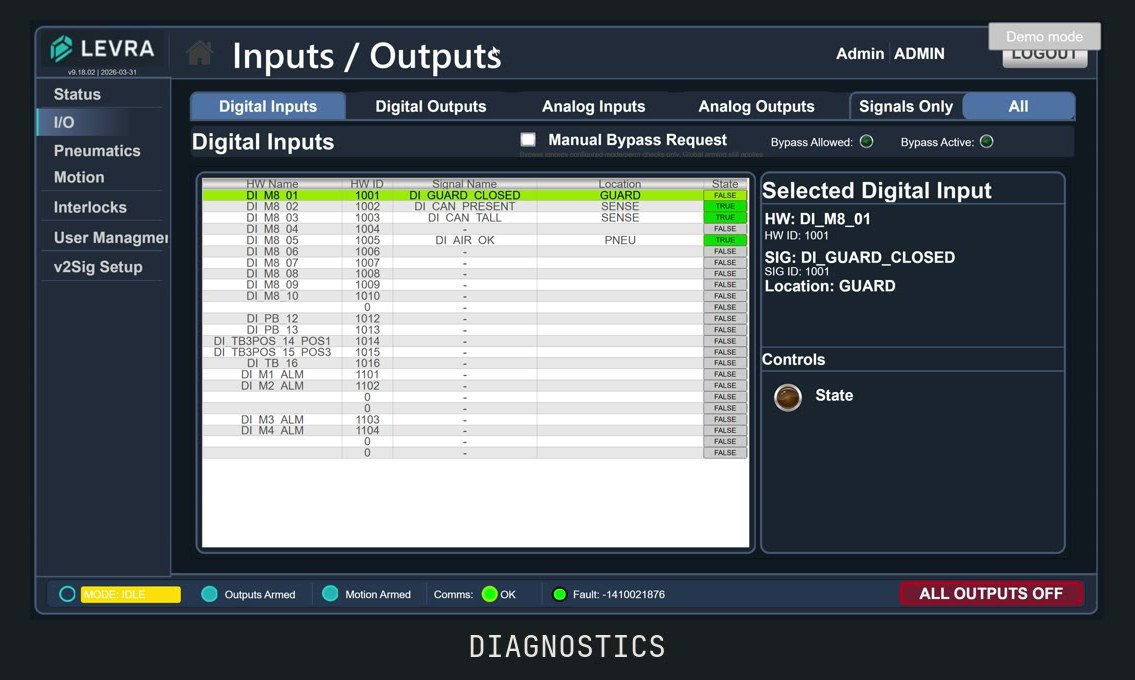
The same I/O viewer, signal trace, and debug pages on every machine. Every output flows through a unified interlock check, so when something will not fire the HMI names the condition blocking it.
Manual & Step Assist
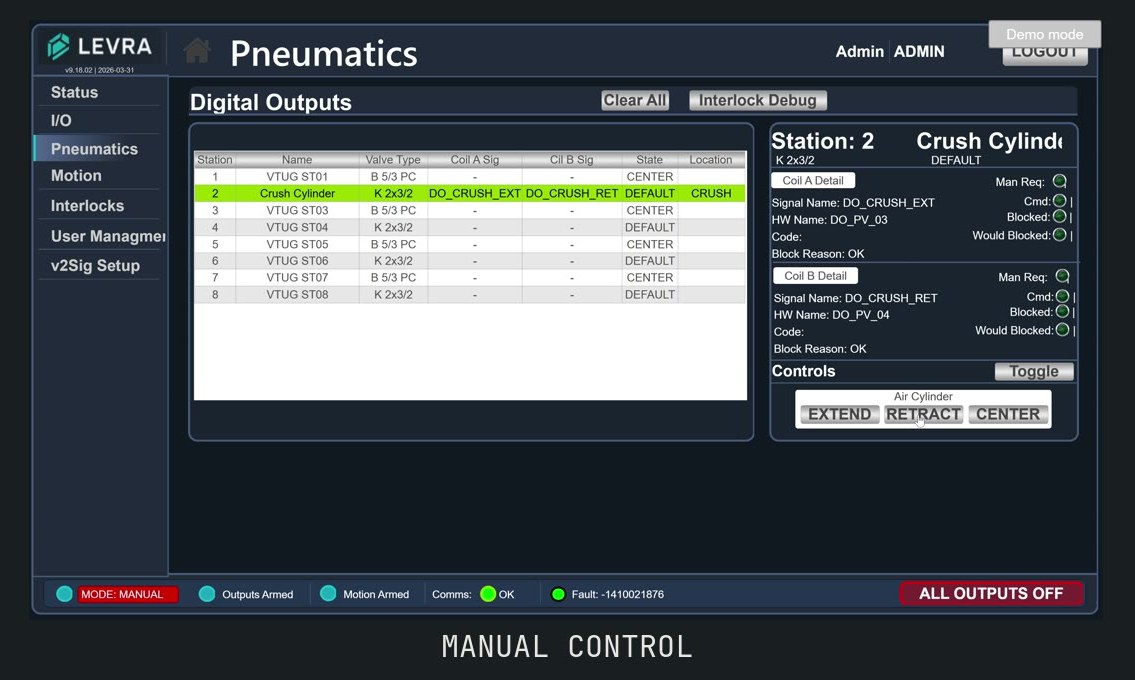
Per-output manual control, plus a commissioning mode that walks the machine through its cycle one phase at a time. Used for bring-up, debug, and operator training.

Also standard on every machine: Modbus/TCP comms health with debounced state (300 ms loss / 500 ms restore) and automatic recovery on reconnect, and a parameter system where operators tune timing, limits, and recipes from the HMI with values that persist across power cycles.
HMI auto mode screen HMI fault recovery screen with code, cause and corrective action HMI job tracking screen HMI login screen with role-based access HMI diagnostics screen HMI manual control screen

Why this matters to your project

The controls work that is the same on every machine only gets written once, so engineering hours go into what is unique about your build. Commissioning starts from a shell that has already been debugged on other machines, which is time that comes off your schedule rather than off the testing.

Why it matters after handover

Every machine presents the same modes, the same fault popup, and the same job tracker, so an operator trained on one cell is already familiar with the next. Standardized structure also means your maintenance crew or an outside contractor can open the machine and understand its controls without reverse-engineering anything.

Handover package

What you receive when the machine is accepted.

Documentation is a deliverable tied to acceptance. You receive the complete CODESYS project and HMI source for your machine with a perpetual licence to run, maintain, and modify it — nothing is withheld to keep you calling us.

Bill of materials
Complete BOM with part numbers.
Electrical prints
Panel drawings and field wiring that match what was actually built.
I/O map
Every input and output named, addressed, and documented.
PLC & HMI source
The CODESYS project and HMI files for your machine, plus backups, with a perpetual licence to run, maintain, and modify them.
O&M documentation
Operating and maintenance basics for the people who run the machine.
FAT / SAT protocols
Acceptance criteria agreed before the build, signed before and after install.
Training
Operators and maintenance staff trained on the machine before we leave.

Ways to work together

From “we should automate this” to a running cell.

We adapt to where you are, whether you are testing feasibility or ready to build.

Automation Roadmap Sprint

$15,000

A week on your floor mapping the current process and finding the real constraints, ending in a prioritized roadmap with realistic budgets.

  • Process observation, constraint mapping, and interviews with operators, maintenance and engineering.
  • Preliminary concepts and layouts built around your parts.
  • Investment, benefit and payback estimates, prioritized into a practical roadmap.
  • 50% credits toward Levra engineering on a qualifying build started within six months — engineering and design only, not equipment or fabrication. The roadmap is yours either way.

Design & build

Fixed price

Full execution from design through FAT, installation, and SAT for cells and stations. Fixed-price when the scope is defined; capped cost-plus when it is still uncertain, so you are never signing a blank check.

  • Mechanical, controls, and HMI designed as one system.
  • Built and debugged with your parts against agreed criteria.
  • Install, SAT on your floor, and operator and maintenance training.

Feasibility / concept study

Scoped, credits forward

When a project is clearly worth doing but not yet definable, a short paid phase produces what is needed to quote it honestly.

  • Layouts, cycle-time validation, and component selection.
  • A machine specification you own, whether or not you build with us.
  • The cost credits toward the build if you award it.

Not sure which of these you need?

Describe the station and we’ll tell you what fits, what needs discovery first, and what should stay manual for now.